



Weighted, Sequential, and Clock Rotations Explained
If you’ve set up automated playback before, you’ve probably built a playlist. In Streaming.Center, a rotation is the next step up: instead of one flat list of tracks, a rotation is a set of rules that decide what plays and when. Think of a playlist as a stack of songs, and a rotation as a program director’s instructions for the whole hour — “play a song, then maybe a jingle, then check if there’s a request, repeat.”
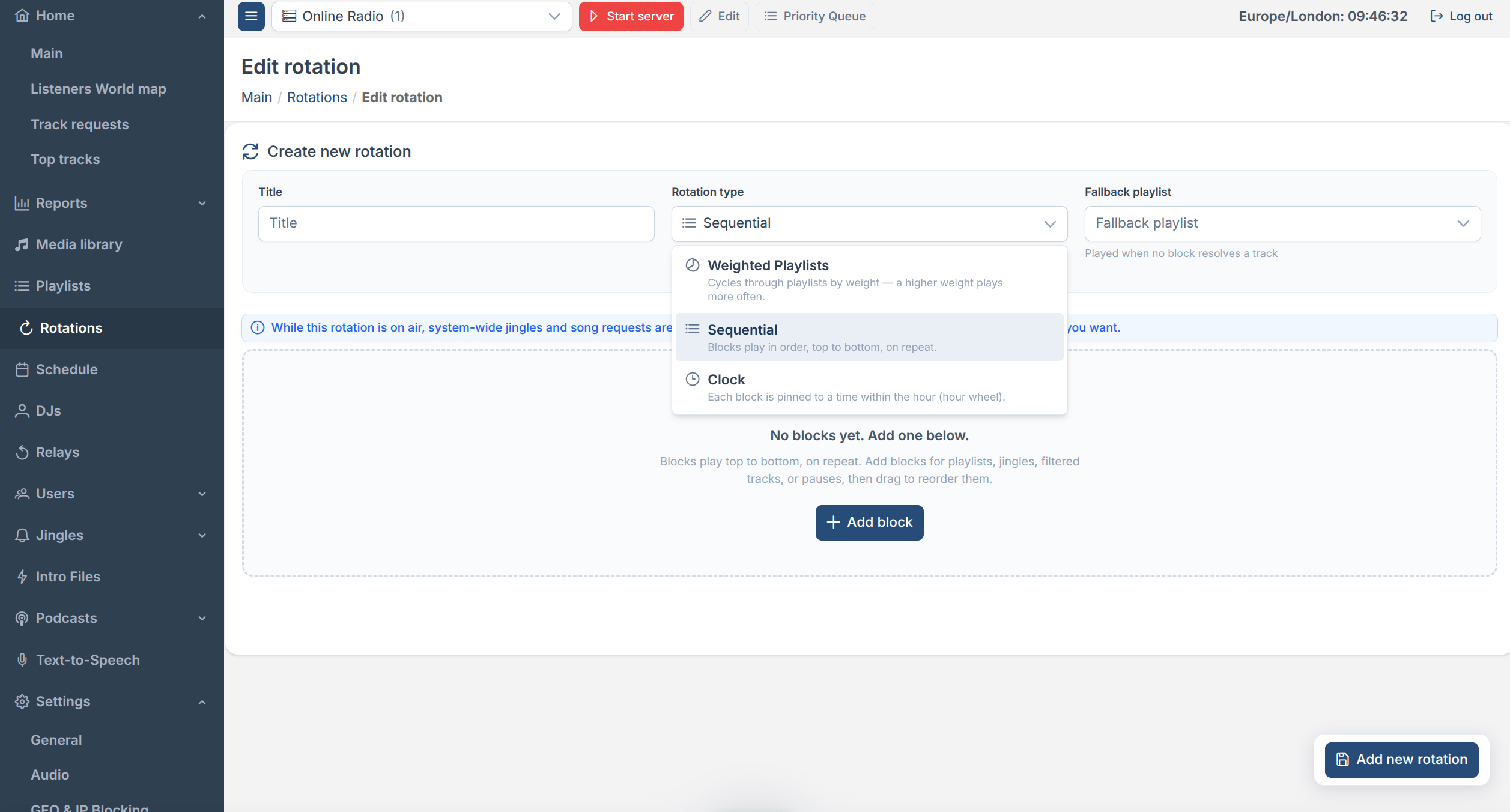
The Streaming.Center platform offers three rotation types, and picking the right one depends on how much control you want over timing:
| Type | Best for | How it decides what’s next |
|---|---|---|
| Weighted | “Play mostly from playlist A, sometimes B” | Playlists, picked by weight |
| Sequential | A repeating show format (e.g. 3 songs → jingle → ID) | A fixed list of blocks, played in order, forever |
| Clock | Strict hour-by-hour programming (news at :00, ID at :15…) | Blocks anchored to a time inside the hour |
See the screenshot:
All three live in the same place in the Streaming.Center control panel and share playlists, jingles, and the station’s music library — you’re just choosing a different scheduling engine for them.
Weighted Rotations
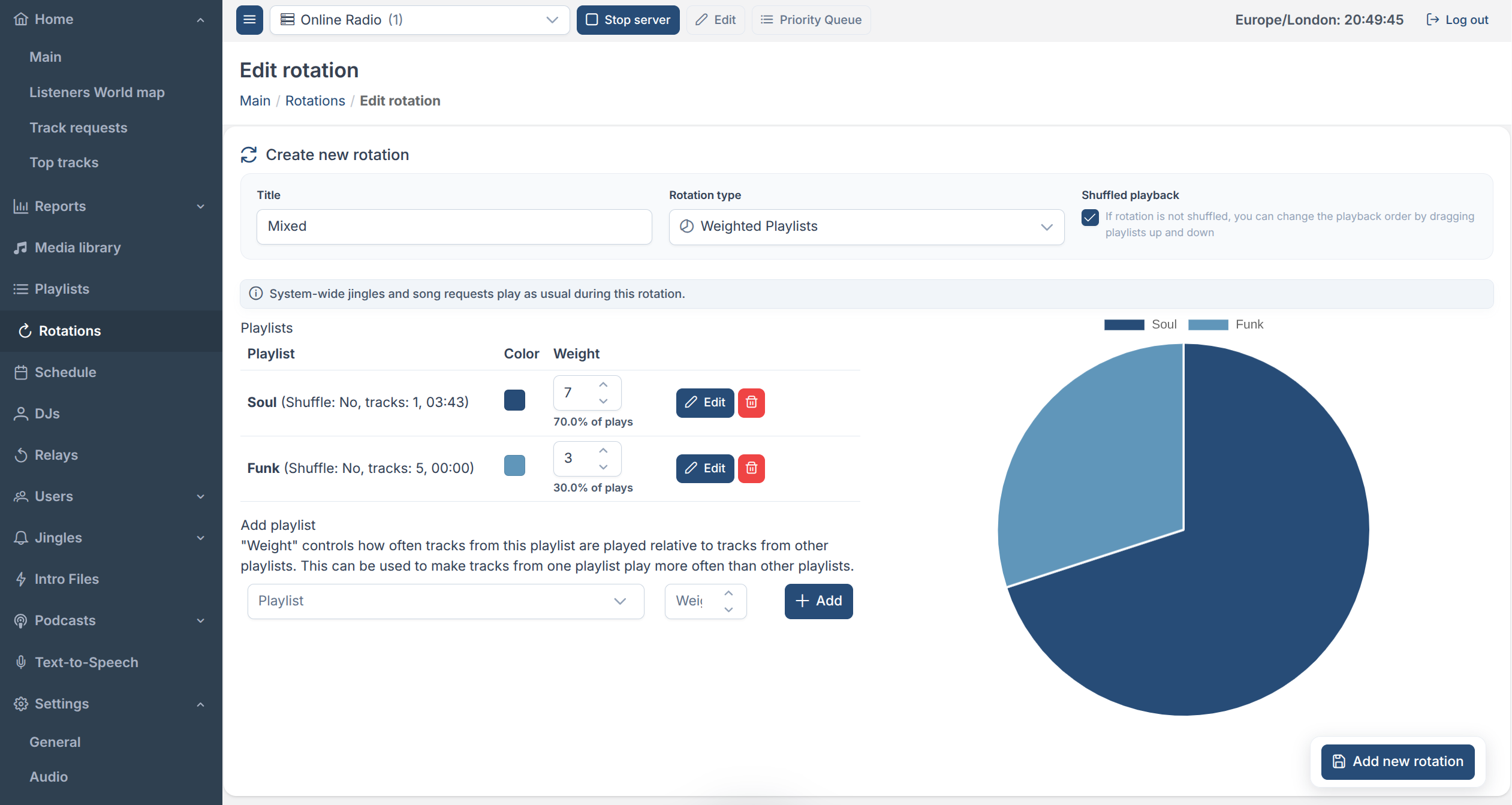
A weighted rotation in Streaming.Center combines several playlists into one source and controls how often each one is heard, using a weight you set per playlist. It has two modes:
- Shuffled — playlists are picked at random, more often for higher weights. The rotation avoids repeating a playlist until every other one has had a turn.
- In order — playlists play back-to-back in a fixed order. The weight becomes “how many tracks to play from this playlist before moving to the next.”
This is the type to reach for when you don’t need exact timing — just a mix of “70% new releases, 30% classics,” for example.
Example
Suppose a weighted rotation contains two playlists:
- Playlist A has a weight of 7.
- Playlist B has a weight of 3.
The total weight is 10, so for every 10 tracks the rotation selects, the system picks 7 tracks from Playlist A and 3 tracks from Playlist B. In other words, Playlist A provides 70% of the tracks and Playlist B provides 30%.
Sequential Rotations
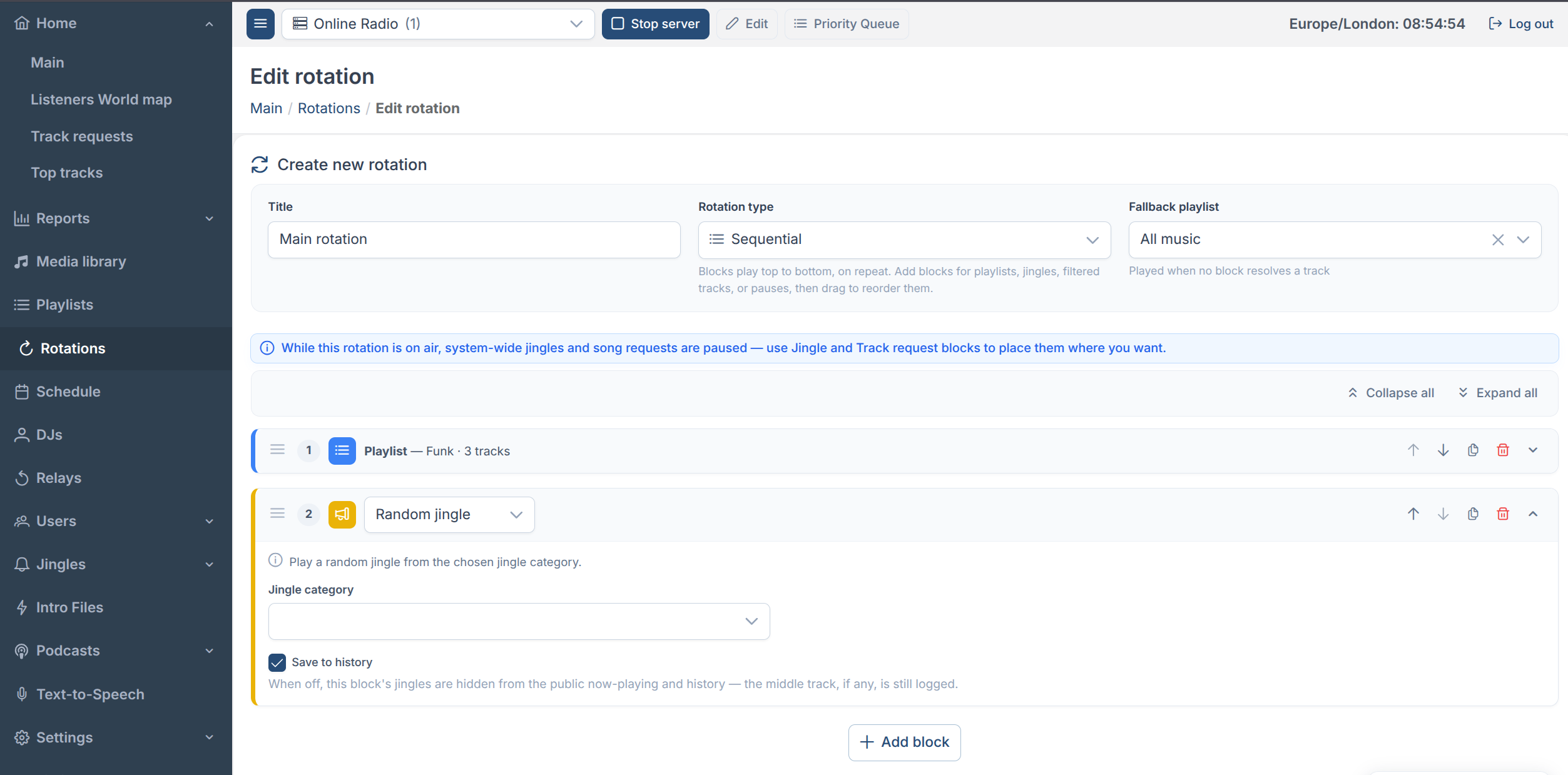
In the Streaming.Center control panel, a sequential rotation plays a fixed list of blocks in order, and when it reaches the end, it starts over from the top — forever. There’s no clock involved; a block simply plays until it’s done, and then the next one begins.
Block types
Each block does one specific thing:
| Block | What it plays |
|---|---|
| Playlist | Tracks from a chosen playlist — either a fixed number, or the whole playlist |
| Specific track | One exact song, every time |
| Random track | One track picked from the library, optionally filtered by category, genre, artist, folder, “not played recently,” or “added recently” |
| Category tracks | A given number of random tracks from one music category |
| Specific jingle | One exact jingle |
| Random jingle | A random jingle from a chosen jingle category |
| Jingle sandwich | An intro jingle → a track (specific or random) → an outro jingle, as one unit |
| Listener request | The oldest pending song request. If nobody has requested anything, this block is invisible — the rotation simply moves on to the next block instead of playing a filler track. This keeps things like “jingle → request → jingle” sounding intentional even with no request in queue. |
| Wait | Pauses the rotation’s progress (see below) |
The Wait block
Wait is unique to sequential rotations. It holds the rotation at its current point until a target time is reached, and fills the gap with tracks from a filler playlist (or the rotation’s fallback playlist, if none is set). Three ways to set the target:
- Wait N minutes — from right now.
- Wait until a time of day — e.g. 14:00; rolls over to tomorrow if that time already passed today.
- Wait until minute :MM — the next time the clock hits that minute mark, this hour or next.
A common use: play the top-of-hour ID, then WAIT until :00 to hold everything else
until the next hour before continuing the sequence.
Clock Rotations
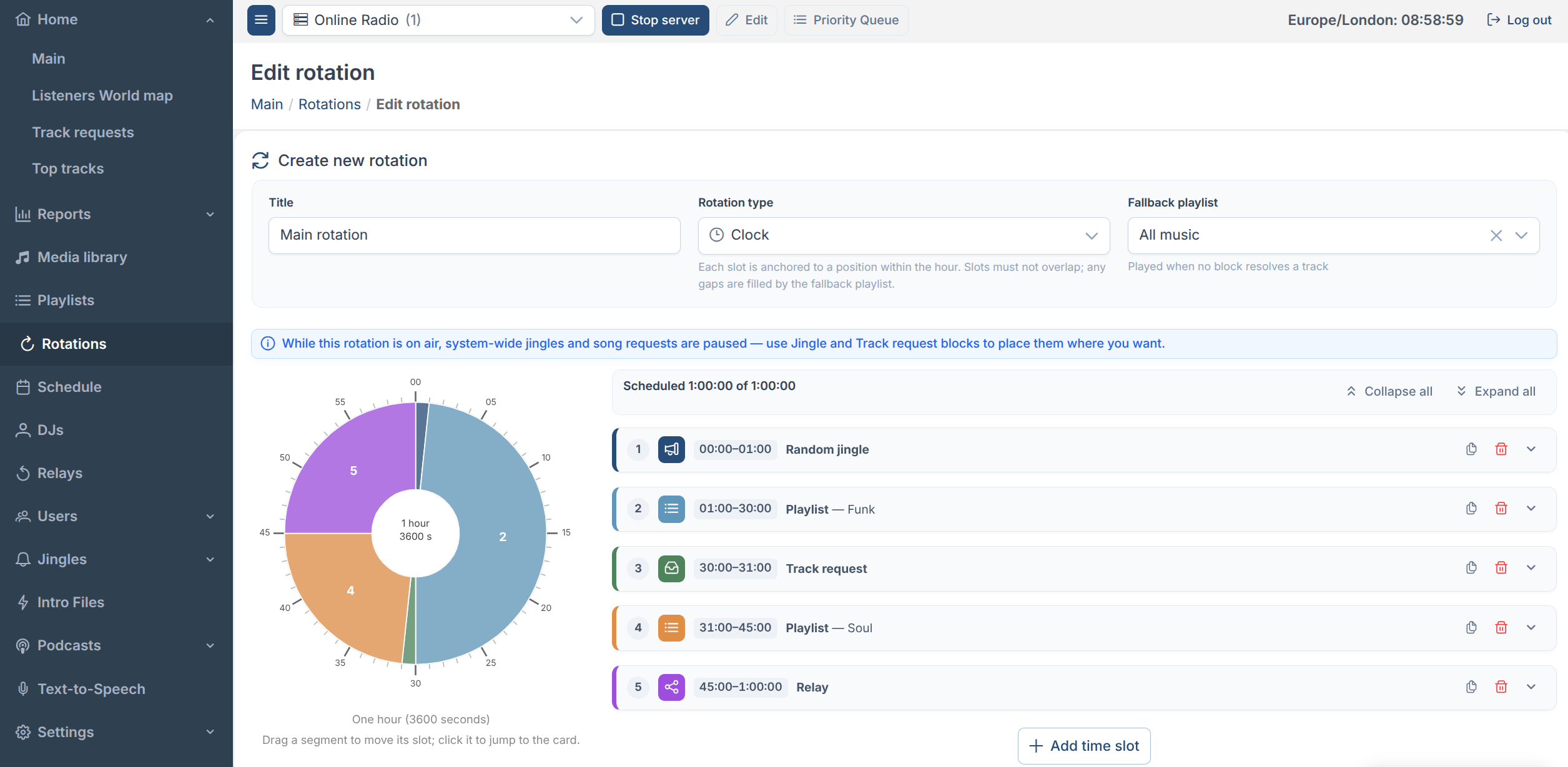
A clock rotation lays out one hour as a wheel in the Streaming.Center scheduling interface. Every block (“slot”) is anchored to a specific point in the hour rather than to “whatever came before it.” A slot starting at 15:00 into the hour always starts at :15:00 on the wall clock, hour after hour, for as long as the rotation is on air.
This is the type for strict broadcast schedules — legal IDs, hourly news, ad breaks — where the exact minute matters more than what happened to be playing before it.
Block types
Clock slots support the same content blocks as sequential ones (Playlist, Specific track, Random track, Category tracks, Specific jingle, Random jingle, Jingle sandwich, Listener request), except Wait — a clock slot’s timing already comes from its position on the wheel, so “wait” doesn’t apply. Instead, clock rotations get one type sequential doesn’t have:
| Block | What it does |
|---|---|
| Relay | Hands the stream over to another live source (e.g. a relayed station) for the whole slot. Nothing plays from this rotation during that window — normal programming resumes automatically once the slot ends. |
Timing modes
Every slot also has a timing mode, which controls how firmly its start time is enforced against whatever is currently playing:
| Mode | Behavior |
|---|---|
| Soft (default) | Never interrupts. If the current track is still playing when the slot’s time arrives, the slot’s content plays as soon as that track ends — as long as we’re still inside the slot’s window. If the track runs long enough to spill past the slot entirely, the slot is skipped for that hour. |
| Strict | Cuts the current track immediately at the slot’s start time, no matter what’s playing. Use this for content where the exact second matters — station IDs, legally mandated announcements. |
| Back-timed | The opposite problem: content that must finish exactly at the slot’s end (a jingle that needs to land on the hour, for instance). The system calculates the content’s length in advance and starts it early enough to land the ending right on the boundary. |
Slots can mix modes freely — a Soft playlist for most of the hour, with a Strict ID at the top and a Back-timed jingle before a hard cutover.
What plays when a slot has nothing scheduled
Not every second of the hour needs to be assigned. Whatever isn’t covered by a slot — and any slot whose content ends early or fails to load — is filled automatically:
- If the rotation has a fallback playlist set, it plays there until the next slot’s time arrives.
- If there’s no fallback playlist, the gap is silence rather than falling back to some other default source.
- Very short gaps (a few seconds, right before the next slot fires) don’t start a filler track at all — starting a song just to cut it off a second later would sound worse than a brief pause, so the system holds silence instead.
The wheel editor shows this visually: unscheduled time is hatched out, with a summary like “3 gaps (12:40) filled by fallback playlist «Chill Mix»” — or a warning if no fallback playlist is set, so you know that time will go quiet on air.
Which one should you use?
- Want a simple mix of playlists with no strict timing? Weighted.
- Want a repeating show format — “songs, then a jingle, then check requests” — that just loops? Sequential.
- Need specific things to happen at specific minutes of the hour, every hour? Clock.
All three Streaming.Center rotation types can include jingles and listener requests as part of their own blocks. The one difference to keep in mind: while a Sequential or Clock rotation is on air, the station’s global jingle and request settings are paused — those rotations only play jingles and requests where you’ve explicitly placed a block for them.